
Recording a Show - Event Video Set Up
Close up camera that I’ll be operating - Canon C500 mk1. Fixed wide angle camera - capturing the whole stage - Canon C70
Recording a Show
Get into the venue 1 or 2 hours before curtain up
Close up camera that I’ll be operating - Canon C500 mk1
Fixed wide angle camera - capturing the whole stage - Canon C70
I use a mid/side stereo mic set up to record the performers and audience
Two separate mics are placed closer to the stage
A live feed from the sound desk is also used
Radio mics mean no cables trailing along the floor
All mics are recorded on a Sound Devices MixPre II
A quick frame up before the show
Video and audio is edited together and delivered on USB/DVD/online.
My Livestream Set Up
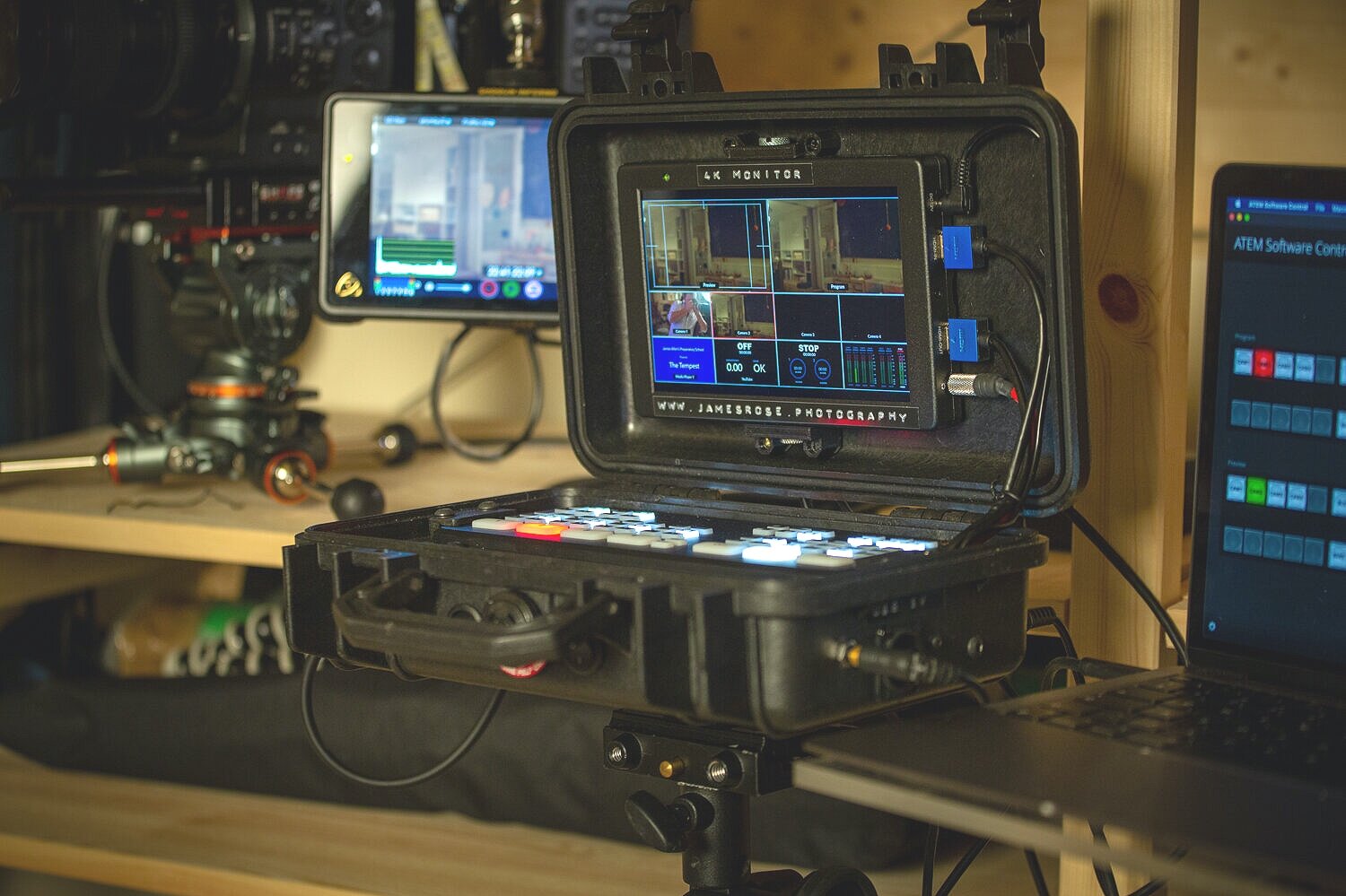
This set up requires a jungle of wires, so I built the Atem Mini Pro into a Peli Box so all the cables are in place and a screen is permanently attached. This was quite an intricate project involving 3D printed parts and lots of soldering. Luckily …
A number of clients have asked for their event to be recorded and, due to very restrictived audience numbers, also livestreamed.
Here is the set up I use. Two cameras feed into a Blackmagic Design Atem Mini Pro, which allows you to switch between them. This works well for live events as one camera is always seeing a wide angle, I can switch to the other camera when I have a good close up, switching back to the wide shot as needed.

This set up requires a jungle of wires, so I built the Atem Mini Pro into a Peli Box so all the cables are in place and a screen is permanently attached. This was quite an intricate project involving 3D printed parts and lots of soldering. Luckily …

… the design, instructions and 3D part templates were all available online via the DSLR Video Shooter YouTube channel. I could not resist this project as it totally solved the problem of wiring and set up time, just open the box and you are ready to plug in your cameras!
I added a few extra inputs and a USB power outlet.


It is useful to have the Atem Mini Pro and laptop on a stand. I mounted a plate on the bottom of the Peli Box and made a small platform for the laptop, both attach to a tripod with various clamps. This makes the whole set up very usable out in the field.


This is a high quality streaming and recording system, which has added to what I can offer clients, and the Atem Peli Box project was such fun to construct. Many thanks to DSLR Video Shooter for the incredibly well thought out instructions and resources. As a side note, whilst thinking about things DSLR related you can check out this article on the difference between SLR and DSLR!
